
by admin | May 30, 2025 | Excel Tips & Tricks
Select the entire data range including blank cells. Go to the Home tab → click Find & Select → choose Go To Special. In the popup, select Blanks → click OK. All blank cells will be selected. Without clicking anywhere else, type =D4 (or the reference to the cell...

by admin | May 29, 2025 | Excel Tips & Tricks
If you’re working with large numbers like Aadhaar numbers, phone numbers, or ID codes in Excel and want to insert a dash (-) automatically after specific digits, follow this simple trick using Custom Formatting. 📝 Example: You have a list of names and their...
by admin | May 28, 2025 | Excel Tips & Tricks
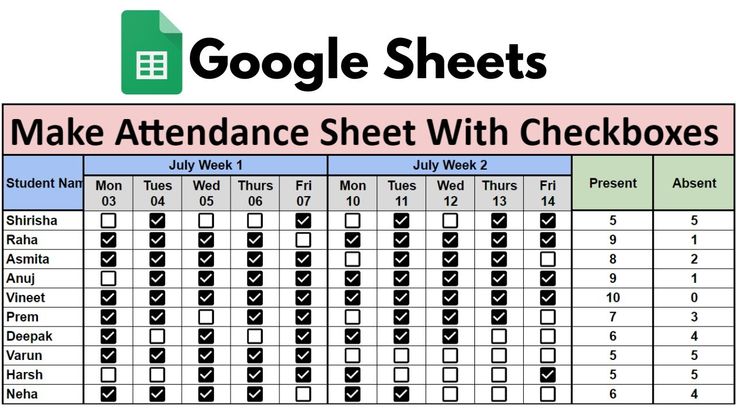
Google Sheets makes tracking attendance super simple using checkboxes and a formula. Follow this step-by-step guide to create your own attendance sheet: 📌 Step-by-Step Guide: Open Google Sheets and enter your data. Example: Column A: Student Names Column B: Attendance...

by admin | May 27, 2025 | Excel Tips & Tricks
Dealing with duplicate data in Excel? Don’t worry — Excel gives you an easy way to highlight duplicates visually before deleting or cleaning them. In this guide, you’ll learn how to highlight duplicate entries using Conditional Formatting, especially...

by admin | May 26, 2025 | Excel Tips & Tricks
📝 Sample Data NamePositionOfficeAgeStart DateRajManagerMumbai3501-01-2021SitaDeveloperDelhi2815-03-2022AmanHR ExecutiveLondon3122-11-2020PriyaAnalystNew York3005-08-2019 ✅ Step-by-Step: Create a Search Box in Excel 📁 Step 1: Open the Excel File Open your Excel sheet...



